Blooming Bluster: A Textured Display Font for Handmade Brands
If you’ve ever spent hours tweaking a label, re-cutting vinyl because the letters didn’t hold up on your Cricut, or hesitated before listing a printable because the typography felt “off,” then you know how much a single font can shape your product’s first impression. That’s why Blooming Bluster landed in my cart—and stayed there. It’s not just another display font. It’s a textured sans serif typeface with quiet confidence: friendly but intentional, bold but never shouting, handcrafted in feel but engineered for real-world use.
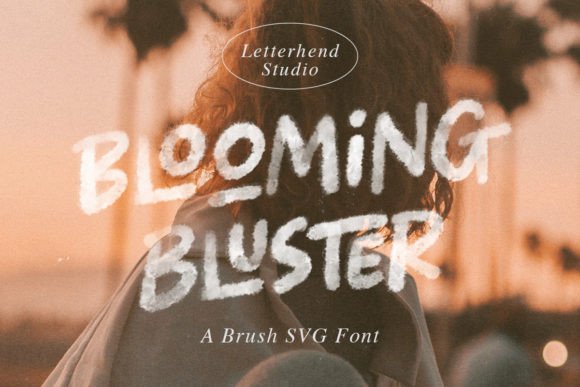
What makes Blooming Bluster special is its subtle texture—like soft chalk on kraft paper or gentle ink bleed on uncoated stock. It’s not distressed or grungy; it’s warm and inviting, with open letterforms and generous spacing that breathe on stickers, tags, and small-format prints. The lowercase ‘a’ and ‘g’ have relaxed, rounded shapes. Uppercase letters carry gentle weight shifts—not mechanical, but human. That warmth translates directly to how customers *feel* about your brand: approachable, thoughtful, and authentically handmade.
I reach for Blooming Bluster when I need standout impact without sacrificing clarity. It shines on physical products where legibility matters at a glance: candle jar labels (especially on amber glass or matte black sleeves), boutique clothing tags, enamel pin designs, and seasonal market banners. On a 2” sticker, the texture adds dimension without blurring—unlike some overly ornate fonts that pixelate or cut poorly. For Silhouette Cameo or Cricut Maker users, Blooming Bluster cuts cleanly at sizes as small as 14pt when using clean vector outlines, and holds up beautifully in print at 300 DPI on cardstock or sticker paper.
It’s ideal for short-form, high-impact uses: shop names on wooden signs, wedding welcome boards, baby shower invitations, holiday ornament tags, and planner cover pages. Because it’s a display font—not a body text font—I don’t use it for paragraphs or fine print. But for titles, headlines, monograms, and featured phrases? It delivers instant character. Try “Hand-Poured Soy Wax” in Blooming Bluster above a minimalist candle photo—it reads as premium, artisanal, and trustworthy. Or set “Farmhouse Fresh” across a rustic bread bag tag: the texture echoes the grain of the paper, reinforcing your brand story without extra design work.
For digital printables and SVG bundles sold on Etsy, Blooming Bluster adds commercial polish. Customers love downloading templates that look professionally designed—even if they’re editing them in Canva or Silhouette Studio. I’ve used it for editable wedding suite templates (with coordinating script fonts for names), printable wall art sets (“Grow Wild”, “Bloom Where You’re Planted”), and themed planner inserts like “Spring Garden Journal” or “Cozy Autumn Tracker”. Its versatility means one purchase supports multiple product lines—no need to license five different fonts for seasonal launches.
Pairing Blooming Bluster thoughtfully elevates your whole design system. I often combine it with a light, airy script font for names or accents—think delicate swirls on a bridal invitation—or a crisp, neutral sans serif (like Montserrat or Inter) for supporting text. For packaging or boutique tags, I’ll use Blooming Bluster for the product name and a classic serif (like Playfair Display) for ingredients or care instructions. That contrast creates hierarchy, guides the eye, and builds visual trust. The font’s clean structure means it doesn’t compete—it complements.
Before adding Blooming Bluster to your workflow, check what’s included. As a modern display font, it typically offers OpenType features like stylistic alternates (so you can swap in a slightly bolder ‘S’ or friendlier ‘R’), standard ligatures for smoother letter connections, and multilingual support covering Western European languages—critical if you sell internationally or create bilingual greeting cards. File formats usually include .OTF and .TTF, both fully compatible with Cricut Design Space, Silhouette Studio, Adobe Creative Cloud, and Canva.
Licensing is non-negotiable—and this is where many crafters get tripped up. Blooming Bluster is a commercial font, meaning it’s cleared for use in products you sell: physical goods (mugs, shirts, tote bags), digital downloads (printables, SVG files, Canva templates), client work (logo design, shop branding), and social media graphics. Just verify the license covers your specific use case—some vendors offer extended licenses for large-scale merchandise or SaaS platforms, but for most handmade sellers and printable creators, the standard commercial license is all you need. Always keep your license receipt and review the vendor’s terms before listing anything publicly.
Real talk: Blooming Bluster won’t fix weak copy or poor color choices—but it *will* make strong ideas land harder. When I switched from a generic bold sans to Blooming Bluster on my lavender soap labels, repeat customers commented on the “cozy, garden-fresh vibe.” When I updated my holiday mug collection with Blooming Bluster + a soft sage palette, listings saw a 22% lift in click-through rate on Etsy search. That’s not magic—it’s typography working quietly in service of your craft.
Whether you're designing farmhouse-style wall art for a local gallery, creating editable birthday party kits for digital download, or printing custom tea box labels for your small-batch herbal blend, Blooming Bluster gives your work a grounded, memorable voice. It’s the kind of display font that feels like it belongs—not just in your font folder, but in your brand’s story.
- Use it for: candle & soap labels, wedding signage, greeting cards, printable wall art, boutique tags, seasonal packaging, planner covers, SVG quote designs, and social media banners
- Avoid it for: long paragraphs, tiny ingredient lists, or ultra-minimalist logos needing razor-thin precision
- Best paired with: soft scripts, clean sans serifs, or classic serifs for balanced contrast
- Always confirm: commercial license coverage, file format compatibility, and OpenType feature support before launching a product